Lead ID Links
🎯 Advanced Campaign Tracking System
Lead ID Links is a comprehensive campaign tracking system that enables you to identify the source of every lead with precision, helping you analyze campaign effectiveness and make data-driven marketing decisions.
What is a Lead ID?
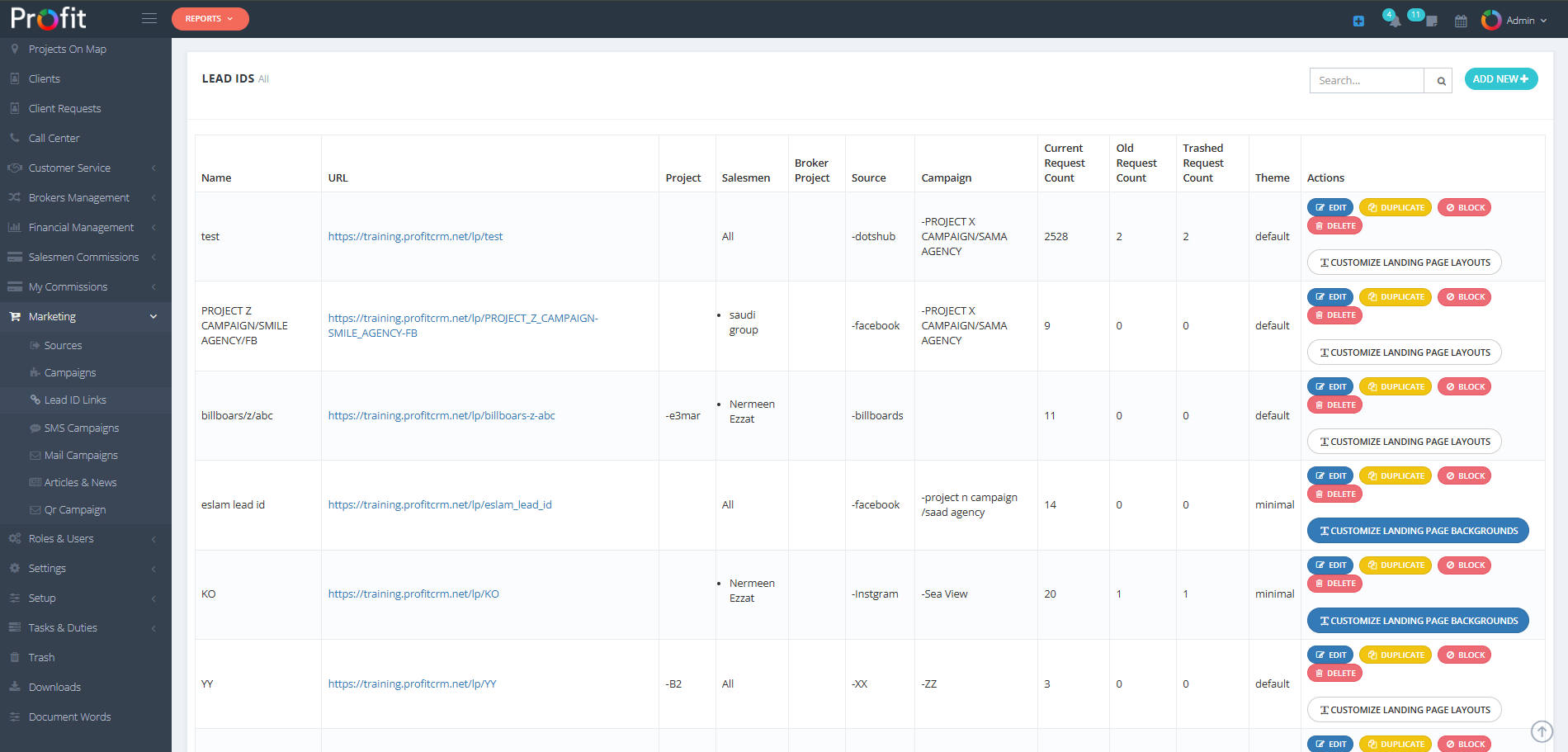
A Lead ID is the source identifier that allows us to track the origin of each lead accurately. When a marketer begins working, the first thing they must do to enter a lead into the system is create a Lead ID because it connects the customer's data to their source and the project they came for.
Lead IDs Table Structure
📊 Table Columns
- Name: Lead ID identifier name
- URL: Campaign or source link
- Project: Associated project
- Salesmen: Assigned sales representative
- Broker Project: Broker-related project
- Source: Lead source origin
- Campaign: Associated marketing campaign
- Current Request Count: Active requests
- Old Request Count: Completed requests
- Trashed Request Count: Deleted requests
- Theme: Landing page design
- Actions: Edit and management options
Adding New Lead IDs
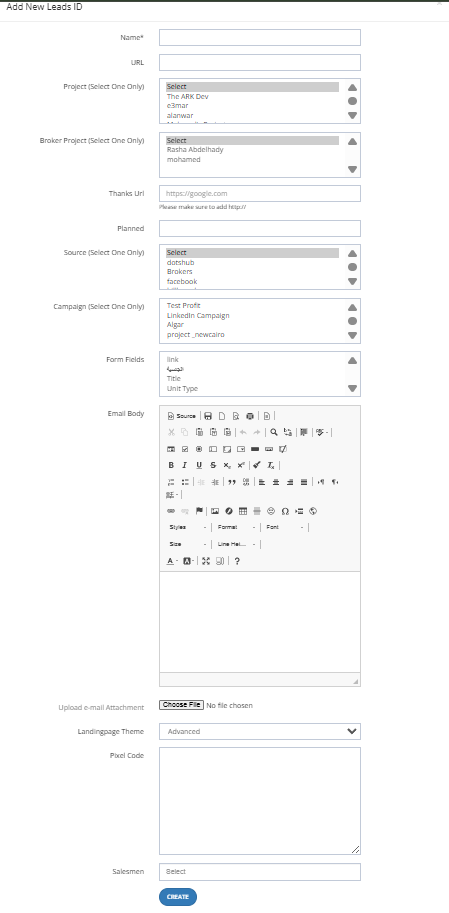
The ADD NEW button opens a comprehensive form for creating new Lead IDs:
📝 Form Fields
- Name* (Required): Unique Lead ID identifier
- URL: Campaign or source link
- Project (Select One Only): Associated project
- Broker Project (Select One Only): Broker project selection
- Thanks URL: Please make sure to add http://
- Planned: Planning information
- Source (Select One Only): Lead source selection
- Campaign (Select One Only): Campaign selection
- Form Fields: Custom form field configuration
- Email Body: Email content template
- Attachment: File attachments
- Landing Page Theme: Page design template
- Pixel Code: Tracking pixel code
- Salesmen: Sales representative for campaign leads
Filtering System
🔍 Filter Options
- Lead IDs: Filter by Lead ID identifier
- From (Created Date): Start date filter
- To (Created Date): End date filter
Important: The filter works with AND logic, not OR - all specified conditions must be met
Strategic Benefits
🚀 Business Value
- Precise Source Tracking: Identify the origin of every lead
- Performance Analysis: Evaluate campaign effectiveness
- Resource Optimization: Focus efforts on high-performing sources
- ROI Improvement: Increase marketing return on investment
- Data-Driven Decisions: Make informed strategic choices
Best Practices
💡 Expert Recommendations
- Consistent Naming: Use clear, descriptive names for Lead IDs
- Regular Monitoring: Track performance metrics consistently
- Proper Assignment: Ensure qualified salesmen are assigned to campaigns
- URL Verification: Always verify URLs and tracking codes
- Data Analysis: Regularly review and analyze lead performance
روابط معرفات العملاء المحتملين
🎯 نظام تتبع الحملات المتقدم
روابط معرفات العملاء المحتملين عبارة عن نظام تتبع شامل للحملات التسويقية يمكنك من معرفة مصدر كل عميل محتمل بدقة، مما يساعدك في تحليل فعالية حملاتك واتخاذ قرارات تسويقية مدروسة.
ما هو معرف العميل المحتمل؟
معرف العميل المحتمل هو مصدر الليد الذي يمكننا من خلاله تتبع مصدر العميل المحتمل بدقة. عندما يبدأ المسوق في العمل، أول شيء يجب عليه فعله لإدخال العميل المحتمل إلى النظام هو إنشاء معرف العميل المحتمل لأنه يربط بيانات العميل بمصدره والمشروع الذي جاء من أجله.
جدول معرفات العملاء المحتملين
📊 أعمدة الجدول
- الاسم: اسم معرف العميل المحتمل
- الرابط: رابط الحملة أو المصدر
- المشروع: المشروع المرتبط بالعميل المحتمل
- موظف المبيعات: المسؤول عن متابعة العملاء المحتملين
- مشروع الوسيط: المشروع المرتبط بالوسيط
- المصدر: مصدر العميل المحتمل
- الحملة: الحملة التسويقية المرتبطة
- عدد الطلبات الحالية: الطلبات النشطة
- عدد الطلبات القديمة: الطلبات المنتهية
- عدد الطلبات المحذوفة: الطلبات المحذوفة
- القالب: تصميم صفحة الهبوط
- الإجراءات: خيارات التعديل والحذف
إضافة معرف جديد
زر إضافة جديد يفتح نموذج شامل لإنشاء معرف عميل محتمل جديد:
📝 حقول النموذج
- الاسم* (مطلوب): اسم فريد لمعرف العميل المحتمل
- الرابط: رابط الحملة أو المصدر
- المشروع: اختيار مشروع واحد فقط
- مشروع الوسيط: اختيار مشروع وسيط واحد فقط
- رابط الشكر: تأكد من إضافة http://
- مخطط: معلومات التخطيط
- المصدر: اختيار مصدر واحد فقط
- الحملة: اختيار حملة واحدة فقط
- حقول النموذج: تخصيص حقول النموذج
- محتوى البريد الإلكتروني: نص البريد الإلكتروني
- مرفق: ملفات مرفقة
- قالب صفحة الهبوط: تصميم الصفحة
- كود البكسل: كود التتبع
- موظف المبيعات: المسؤول عن العملاء المحتملين من الحملة
نظام التصفية
🔍 خيارات التصفية
- معرفات العملاء المحتملين: تصفية حسب المعرف
- من (تاريخ الإنشاء): تاريخ البداية
- إلى (تاريخ الإنشاء): تاريخ النهاية
تنبيه: يعمل الفلتر بنظام "و" وليس "أو" - يجب توفر جميع الشروط المحددة
الفوائد الاستراتيجية
🚀 القيمة التجارية
- تتبع دقيق للمصادر: معرفة مصدر كل عميل محتمل
- تحليل الأداء: تقييم فعالية الحملات المختلفة
- تخصيص الموارد: توجيه الجهود للمصادر الأكثر فعالية
- تحسين العائد: زيادة عائد الاستثمار التسويقي
- اتخاذ القرارات: قرارات مدروسة بناءً على البيانات